
A look inside
Big pictures, and nothing else on the screen.
This is TapeBox on an Apple TV, with a small library of free open films. Yours looks the same, with your own films and posters.
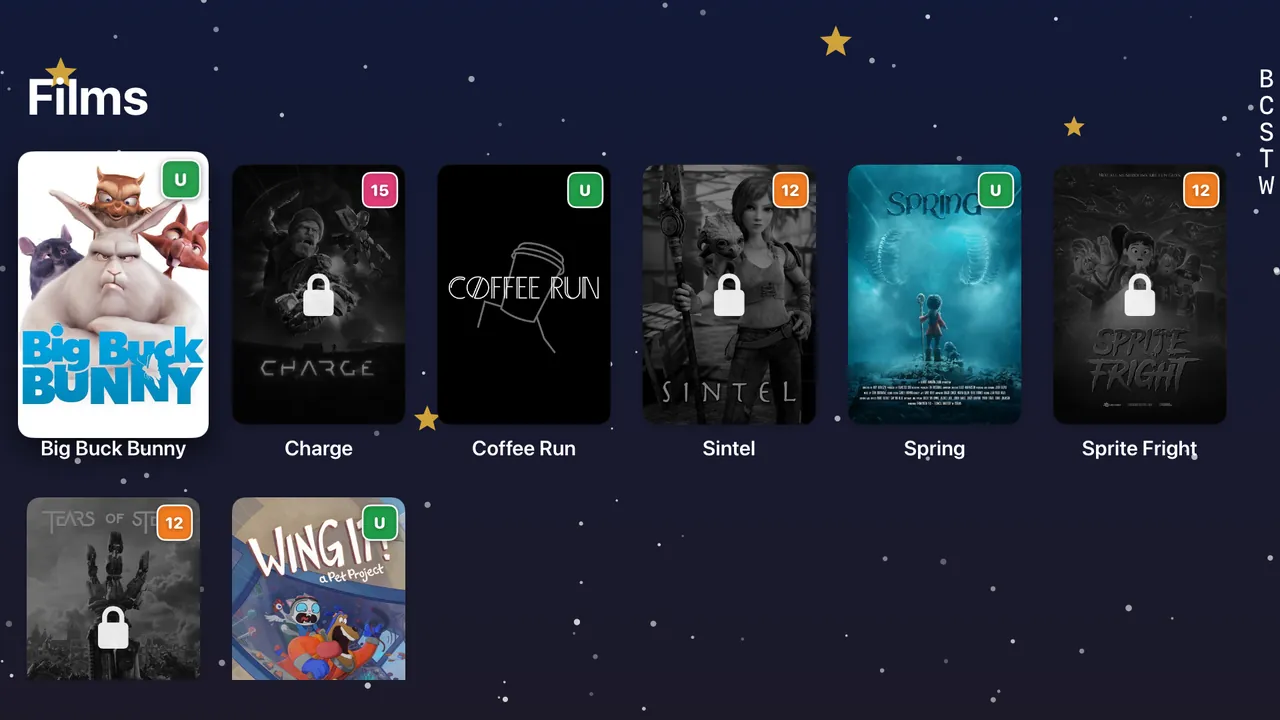
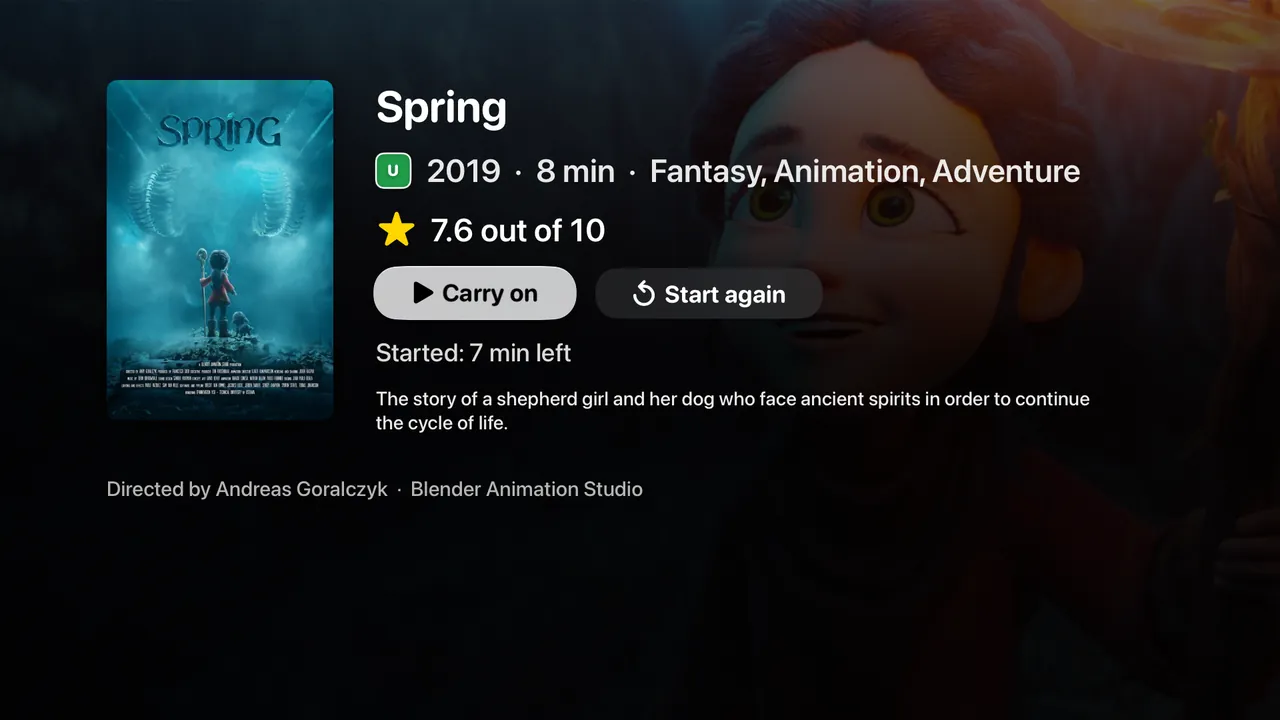
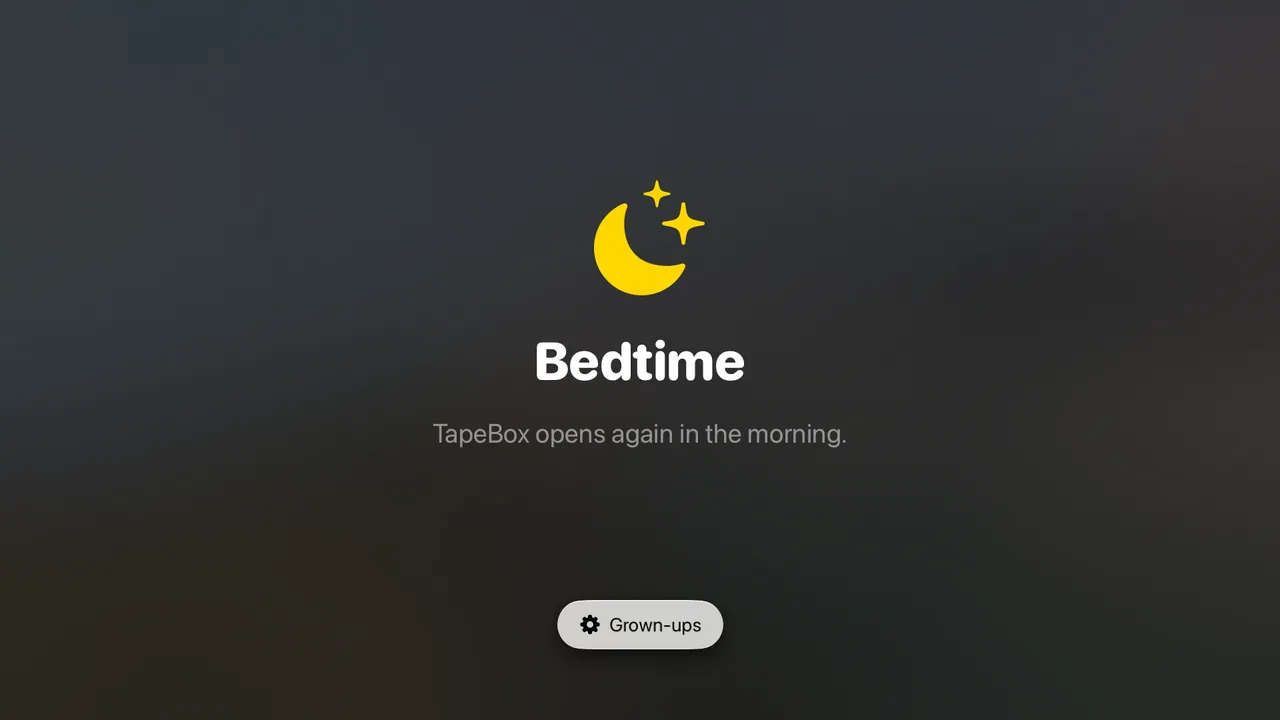
The films in these pictures are open films by Blender Studio, © Blender Foundation: Big Buck Bunny, Sintel and Tears of Steel under CC BY 3.0, and Spring, Coffee Run, Sprite Fright, Charge and Wing It! under CC BY 4.0, shown here in screenshots of TapeBox. Blender Studio doesn’t make or endorse TapeBox.
Age ratings
Every film wears its age rating.
Every poster shows its age rating, big enough to read from the sofa. Children learn what the badges mean, and grown-ups use them to decide what each screen shows.
Self-hosted
Your library, not a catalogue.
Streaming catalogues change every month. A film your child loves can vanish when a licence runs out, and the price keeps going up. A media server at home holds your own library, arranged your way, and TapeBox is how the children watch it.
- Nothing to cancelTapeBox is one payment, and your server is yours. There’s no monthly fee to remember.
- Nothing comes to usTapeBox talks to your own server, and keeps the family’s settings in your own iCloud. There’s no TapeBox account, no adverts and no tracking.
- Quick at homeOn your home network TapeBox uses your server’s home address, so a film starts without a trip out to the internet and back.
Screen time
A shelf, not a feed.
Streaming apps are made to keep children watching: trailers that play by themselves, the next episode counting down, row after row of suggestions. TapeBox has none of that. The film ends, the screen stops, and you decide how much is enough.
- A daily limit for each screenAn hour a day on the playroom iPad, two on the living-room TV. Only playing time counts, not pauses.
- When time’s up, it ends calmlyThe film that’s on finishes, or stops at once if you prefer. Then the shelf says “That’s all for today” until tomorrow, or until a grown-up adds time.
- BedtimeNo new films after the time you choose, until the morning.
- Nothing plays by itselfThe next episode only starts on its own if a grown-up turns that on, and there’s a sleep timer that stops after this one.
- No trailers, no suggestions, no searchOnly the films and series you’ve chosen for this room, as big posters from A to Z.
- See how much is watchedStats shows what’s been watched each day, for how long and on which screen. Leave it off any screen you like.
Your rules
You decide what’s on the shelf.
Children get one calm screen they can manage without asking. Grown-ups decide, room by room, what that screen holds.
What children see
- Big posters, with Keep watching at the top.
- Pick a film and it plays. Pick a series and the next episode is waiting.
- A badge of their own, and Not for me, Like it or Love it when a film ends.
- The age-rating badge on every poster.
What grown-ups control
- Which libraries each device shows: everything in the living room, only the children’s films in the playroom.
- An age limit (U, PG, 12, 15 or 18). Anything above it is hidden, or shows a padlock.
- How long each device plays a day, and a bedtime.
- Settings behind a 4-digit PIN, or Face ID or Touch ID on iPhone, iPad and Mac, and Show everything for one sitting, which locks again by itself.
- A title and a background for each screen: a colour, one of our pictures, or your own photo.
- The order of the shelves: A to Z, newest, by year, by critics’ rating, by age rating, or the family’s favourites first.
- All of it from your iPhone or iPad too, for every screen in the house.
From your phone
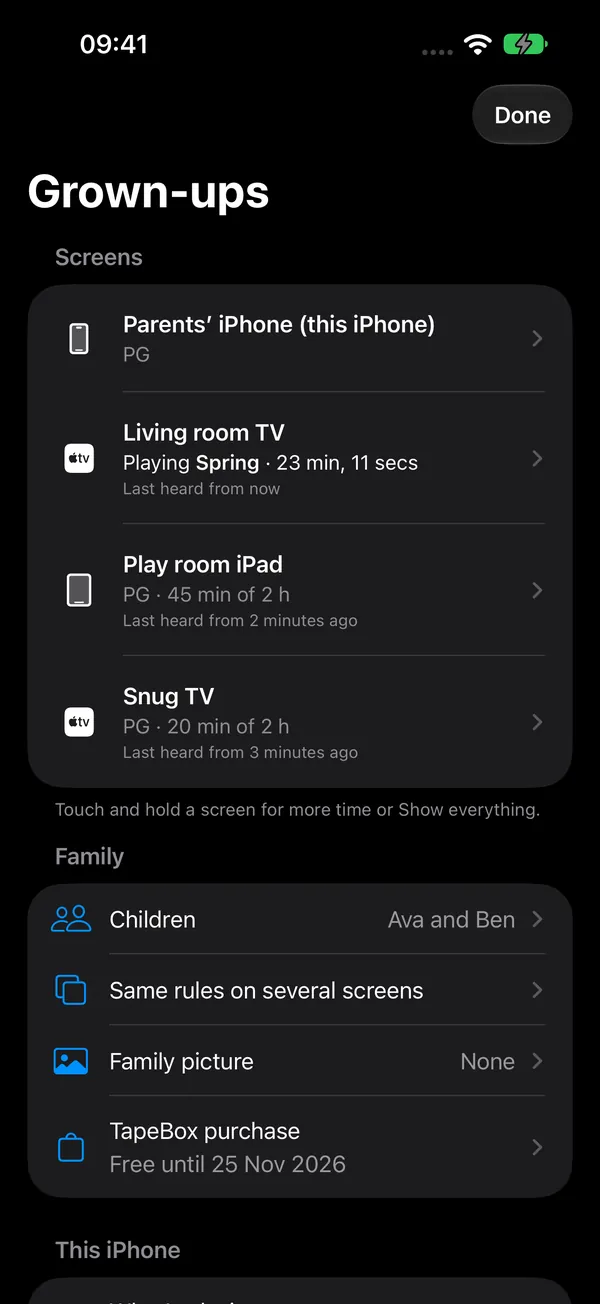
Every screen in the house, on your phone.
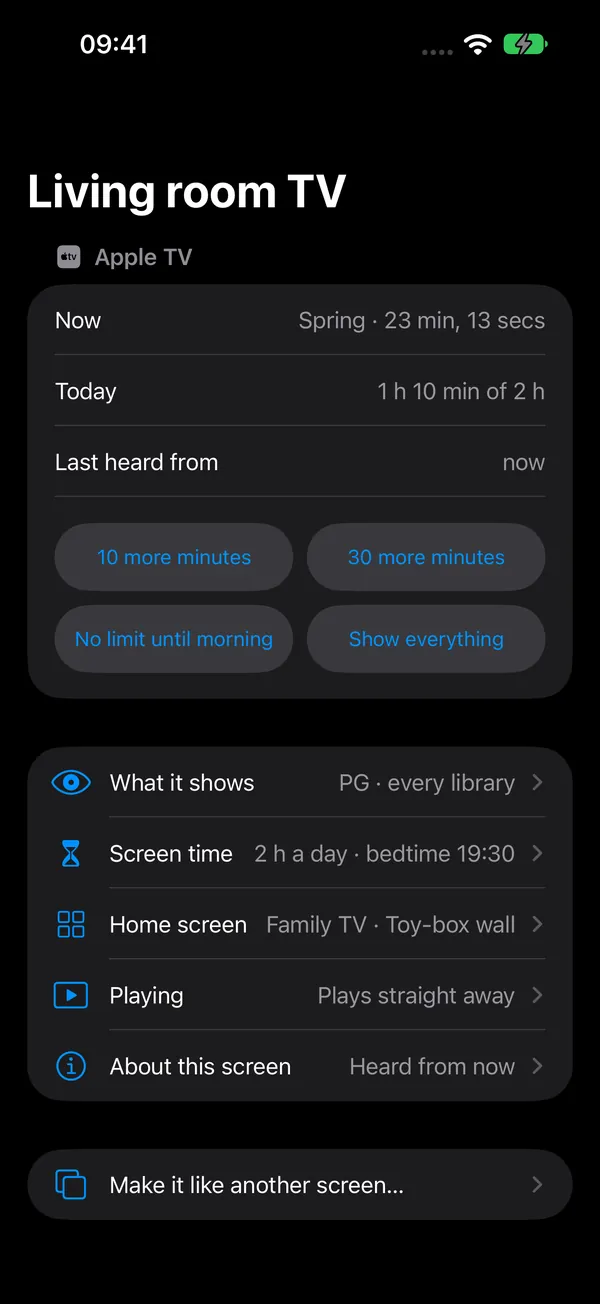
Each Apple TV and iPad keeps its own rules, because each room is different. You don’t have to be in the room to change them. Open TapeBox on your iPhone, enter your PIN, and every TapeBox in the house is there, each with the same page of settings it has on the screen itself. On a grown-up’s own iPhone, TapeBox can open straight onto it.
- See every screenWhat each one is playing, its age limit, and how long it’s played today.
- Change anything from the sofaLibraries, the age limit, screen time, the title and background, the order of the shelves, how films play, even what the screen is called. The TV follows, usually within a minute, and your phone tells you when the change has arrived.
- Ten more minutesAdd a little time, no limit until the morning, or Show everything for one sitting, without finding the remote. Touch and hold a screen to do it straight from the list.
- Set one up, then the restGive other screens the same rules: all of them or just a few, and everything or only the screen time.
- Two grown-ups, two Apple AccountsInvite another grown-up to your TapeBox house, and both your phones see and change every screen, with the same children and Stats.
- On your Lock ScreenYour iPhone can show what each screen is playing and for how long. It catches up each time your iPhone checks in.
Old favourites
Old favourites, back on the shelf.
The films children love most are the ones they’ve watched twenty times. TapeBox lays out your library the way a shelf of tapes used to: big pictures, the right age, and easy to find without reading.
- A shelf, not a folderPosters, the year, the age rating and what it’s about, all from your server’s own information about each film.
- Remembers where they got toCarry on from the same minute in another room, on the Apple TV, iPad, iPhone or Mac.
- What the family thoughtEach child rates what they’ve watched, and their badge goes on the poster, with a heart if they loved it. The family’s favourites get a shelf of their own.
TapeBox doesn’t come with any films or series, and it doesn’t read discs, copy or download anything. It plays what’s on your own server.
For the home lab
Finally, a reason for the family to love the server.
You set up Jellyfin or Plex for yourself, maybe on a NAS or an old PC in the cupboard. TapeBox is the part the rest of the house can use.
- Servers
- Jellyfin and Plex. TapeBox plays what’s on them, and nothing else.
- Finding it
- Jellyfin’s own discovery on the home network, so nobody types an address.
- Signing in
- Jellyfin Quick Connect or plex.tv/link from your phone, or a password.
- Addresses
- A home address and an away address. Home first, when it answers.
- Player
- Apple’s own player. Direct play where the device can.
- Scrubbing
- Jellyfin’s Trickplay images, turned into an I-frame track on the device. Video is repackaged, not re-encoded, where the codecs allow.
- Progress
- Kept on your server, so it follows from room to room and shows in your other apps too.
- Ratings, Stats
- A CloudKit zone in your own iCloud, end-to-end encrypted, shared only with Apple Accounts you invite.
- Age limits
- From each title’s age rating in your server’s information, shown in the device’s own country’s scheme. Unrated hidden by default. Hidden or padlocked, per device.
- Screen time
- A daily limit and a bedtime per device, counted from actual playing time.
- From a phone
- Each device’s settings mirrored in the same iCloud zone. A grown-up’s iPhone sends only the settings it changed, and each device says when it’s applied them.
- Telemetry
- None. No analytics, no crash reporter, no TapeBox server.
Open source
Built for Jellyfin, the open-source media server.
Jellyfin is free, open-source software, made by volunteers. It’s the reason a family can run its own film service at home. TapeBox is a small paid app on top. It doesn’t replace Jellyfin’s own apps; it adds the part made for children.
- Your server stays as it isTapeBox doesn’t change your library. Like any player, it tells your server where each film got to. If you stop using it, nothing there changes.
- Uses what your server already doesQuick Connect, Trickplay images, watch progress and age ratings all come from your server. TapeBox adds no service of its own.
How it will work
Ready in about five minutes.
Install it on each device
Apple TV, iPad, iPhone and Mac. One purchase covers all of them.
Sign in with your phone
TapeBox finds Jellyfin on your home network. Approve a short code with Quick Connect or plex.tv/link, so nobody types a password with the remote.
Choose what this device shows
Set a PIN, pick the libraries, an age limit and how long it can play each day, here or from your phone. Then hand over the remote.
Every feature, device by device, and what’s new in each version
Setting up the TV
Make the Apple TV a children’s TV.
TapeBox looks after what’s inside TapeBox. The Apple TV’s own settings look after the rest: other apps, buying and AirPlay. Ten minutes with the remote, and TapeBox is the easy way in with everything else behind a passcode.
On the Apple TV
- Turn on Restrictions. Settings → General → Restrictions, or hold the TV button and choose Restrictions. Pick a 4-digit passcode the children don’t know.
- Stop buying and renting. In Restrictions, don’t allow purchases, rentals or in-app purchases.
- Limit other apps by age. Choose the highest age rating for apps. Apps above it are hidden, or ask for the passcode.
- Limit Apple’s own films and TV by rating, in the same place.
- Turn off AirPlay in Settings → AirPlay and HomeKit, and lock that setting in Restrictions, so a phone can’t send something else to the TV.
- Make the TV button go Home. Settings → Remotes and Devices → TV Button → Home Screen, so it doesn’t open the Apple TV app.
- Put TapeBox in the top row. Press and hold its icon to move it. In the top row it shows Keep watching above the apps.
- Delete apps you don’t use. Press and hold an app to delete it. You can download it again any time.
- Grown-ups’ profiles. If your Apple TV has a profile for each person, Restrictions can let a grown-up’s profile skip the passcode.
On an iPad or iPhone
- Guided Access keeps it in TapeBox. Settings → Accessibility → Guided Access: turn it on and set a passcode. Open TapeBox, triple-click the side (or Home) button and choose Start. It stays in TapeBox until a grown-up triple-clicks and types the passcode, and you can give it a time limit there too.
- Screen Time for the rest. Settings → Screen Time → Content & Privacy Restrictions: stop purchases and set age limits for apps.
- Keep TapeBox installed. In the same place, under iTunes & App Store Purchases, set Deleting Apps to Don’t Allow, so TapeBox can’t be deleted and set up again.
- Keep bedtime where you set it. With a Screen Time passcode, the date and time can’t be changed by hand, so bedtime and the daily limit can’t be moved either.
- A child’s own Apple Account? Invite that account in Grown-ups, under Sharing, and accept the invitation on the iPad. It then appears with your other screens.
Menu names are from Apple’s current guides and can move between versions of tvOS and iPadOS. TapeBox’s PIN, age limits and screen time work on top of all of this.
Price
Try it for a month. Then buy it once.
- No subscription. An app about not paying every month shouldn’t charge every month.
- One purchase across all the devices in your Apple family: Apple TV, iPhone, iPad and Mac, shared with up to five other people through Family Sharing.
- Nothing is charged when the month ends. TapeBox asks a grown-up, behind the PIN, whether to buy it.
Prices in other countries follow the App Store’s local price for £9.99.
Coming soon
Be first to hear when TapeBox is out.
TapeBox is coming soon to tvOS, iOS, iPadOS and macOS. Leave your email and we’ll tell you the day it reaches the App Store.
Questions
Before you start
When is TapeBox out?
Soon. Join the waitlist and we’ll email you the day it reaches the App Store.
What do I need?
A Jellyfin or Plex media server with your family’s films and series on it. TapeBox doesn’t come with any films or series of its own.
Do I need to be technical?
Someone has to set up the media server, and that’s the technical part. Once it’s running, setting up TapeBox takes a few minutes, and after that a five-year-old can use it.
Jellyfin or Plex?
Both work. The pictures you see while scrubbing through a film need Jellyfin with Trickplay turned on.
How strong is the lock?
Each device signs in with one account on your server, and TapeBox hides what you’ve turned off. That holds against children.
For a lock that holds against a teenager with a laptop, make a separate user for the children on your server and limit it there.
We have two Apple Accounts. Can we both use it?
Yes. One of you invites the other in Grown-ups, under Sharing. Then both of your phones see every screen in the house, with the same children and Stats. The house has one grown-up PIN, the same on every screen. The purchase is shared through Family Sharing.
What if we forget the PIN?
Type any PIN, then choose Forgot the PIN?. An administrator of your Jellyfin server, or your Plex server’s owner, approves a code on their phone and chooses a new PIN for the whole house.
What happens when the free month ends?
Nothing is charged. TapeBox stops playing and asks a grown-up, behind the PIN, whether to buy it. Your settings, ratings and Stats are kept.
Can TapeBox play DVDs or Blu-rays?
No. TapeBox doesn’t read discs, and it doesn’t copy or download anything. It plays video from your Jellyfin or Plex server.
Privacy policy
The app collects nothing.
TapeBox is made by DB Five Ltd. The TapeBox app doesn’t collect any information about you or your children. There is no TapeBox account, and there are no adverts, analytics or tracking.
The app connects only to the media server you sign in to (Jellyfin or Plex) and, if you sign in with Plex, to plex.tv. Your sign-in is kept in each device’s Keychain. Each device’s settings are kept on it and, so you can change them from your other devices, in your own iCloud account.
Children’s names, badges and ratings, and the record of what’s been watched for Stats and screen time, are stored in your own iCloud account so your other devices can show them. If you share your TapeBox house with someone, for example another grown-up with their own Apple Account, it’s shared with them through iCloud, from your account. All of it is end-to-end encrypted, and DB Five can’t see any of it.
If you choose Face ID or Touch ID instead of the PIN, your device checks it. TapeBox never sees your face or fingerprint.
Purchases go through the App Store. Apple handles payment, and we don’t receive your payment details.
This website sets no cookies and runs no tracking scripts. Its fonts and pictures come from tapebox.tv itself. Cloudflare runs the website for us, and sees your IP address to send you the page and protect the site from attacks; Cloudflare may handle this outside the UK, under the safeguards UK data protection law requires.
Visit counts. To see which pages are useful, the website counts each visit to a page: which page, the country it came from, the website that linked to it, and whether it was a browser on a phone or a computer, a search engine or an AI crawler. It doesn’t keep your IP address or anything else that identifies you, and the counts are deleted after three months. We do this because it’s in our legitimate interest to know how the site is used.
The waitlist is for grown-ups. If you join, we keep your email address and when you joined, only to tell you when TapeBox is available. We delete the list once we’ve sent that email, and we’ll remove you sooner whenever you ask. To stop misuse, the form counts tries from each IP address for a minute, using a scrambled form of the address. The list is stored with Cloudflare. We use it because you asked us to (your consent), and you can withdraw that at any time by emailing support@tapebox.tv.
Your rights. You can ask what we hold about you, ask us to correct or delete it, or object to or limit how we use it, by emailing support@tapebox.tv. We’ll reply within one month. You can also complain to the Information Commissioner’s Office at ico.org.uk, though we’d like the chance to put it right first.
DB Five Ltd is the data controller, registered with the Information Commissioner’s Office (registration number ZC273362).
Last updated 2 November 2026.
Help
Something not working?
Email us and say which device it’s on and whether you use Jellyfin or Plex. We read every message and reply ourselves. We can help with TapeBox and with connecting it to your server; for setting up the server itself, Jellyfin’s and Plex’s own communities are the best place.